





HADDOCK2.4 basic protein-protein docking tutorial
This tutorial consists of the following sections:
- Introduction
- Setup
- HADDOCK general concepts
- Inspecting and preparing E2A for docking
- Inspecting and preparing HPR for docking
- Adding a phosphate group
- Setting up the docking run
- Analysing the results
- Visualisation
- Biological insights
- Comparison with the reference structure
- Congratulations! 🎉
- Additional docking runs
This tutorial was last updated on 12-03-2026
Introduction
This tutorial will demonstrate the use of HADDOCK for predicting the structure of a protein-protein complex from NMR chemical shift perturbation (CSP) data. Namely, we will dock two E. coli proteins involved in glucose transport: the glucose-specific enzyme IIA (E2A) and the histidine-containing phosphocarrier protein (HPR).
Bacteria use a specific mechanism to import glucose from outside the cell. As glucose enters the cell, a phosphate group is attached to it, i.e. glucose becomes phosphorylated. This phosphorylation prevents glucose from diffusing back out of the cell and at the same time marks it for further metabolism. The phosphate group used for the glucose transport process originates from phosphoenolpyruvate (PEP) and is transferred through a cascade of proteins. It first moves from PEP to enzyme I, then to HPR, next to E2A, and finally to enzyme IIB. Enzyme IIB is located on the cytoplasmic side of the membrane, where the phosphate group is ultimately transferred to glucose as it crosses the membrane. More information can be found in Jeckelmann et al, Eur J Physiol (2020). In the mean time, this animation provides a simple visualisation of the entire process:
The phosphate group travels between these proteins by forming covalent bonds with side chains of amino acids - in bacteria, via histidine residues:

The goal of this tutorial is to model the complex between HPR and E2A at the stage when the phosphate group has been transferred from HPR to E2A.
HADDOCK requires input structures of the molecules to be docked. These inputs can be either experimentally determined unbound structures or computational models. In this case, unbound structures are available for both proteins: E2A was determined by X-ray crystallography (PDB ID 1F3G), and HPR was solved by NMR spectroscopy (PDB ID 1HDN).
The structure of the native complex has also been determined with NMR (PDB ID 1GGR). These NMR experiments have also provided us with an array of data on the interaction itself (chemical shift perturbations, intermolecular NOEs, residual dipolar couplings, and simulated diffusion anisotropy data), which will be useful to guide the docking.
For the purpose of this tutorial, we will only use interface residues identified from NMR chemical shift perturbation data from Wang et al., EMBO J (2000). The structure of the native complex will be used only for the final evaluation of the docking results, and not during the docking itself.
For this tutorial we will make use of the HADDOCK2.4 webserver.
- R.V. Honorato, M.E. Trellet, B. Jiménez-García, J.J. Schaarschmidt, M. Giulini, V. Reys, P.I. Koukos, J.P.G.L.M. Rodrigues, E. Karaca, G.C.P. van Zundert, J. Roel-Touris, C.W. van Noort, Z. Jandová, A.S.J. Melquiond and A.M.J.J. Bonvin The HADDOCK2.4 web server: A leap forward in integrative modelling of biomolecular complexes. Nature Protoc, 19, 3219–3241 DOI: 10.1038/s41596-024-01011-0 (2024)
Throughout the tutorial, coloured text will be used to refer to questions, instructions, and/or PyMOL commands.
This is a question prompt: try answering it! This an instruction prompt: follow it! This is a PyMOL prompt: write this in the PyMOL command line prompt!
Setup
In order to run this tutorial you will need to have the following software installed: PyMOL.
Also, if not provided with special workshop credentials to use the HADDOCK portal, make sure to register in order to be able to submit jobs. Use for this the following registration page: https://wenmr.science.uu.nl/auth/register/haddock.
HADDOCK general concepts
HADDOCK (see https://www.bonvinlab.org/software/haddock2.4/) is a collection of python scripts derived from ARIA (https://aria.pasteur.fr) that harness the power of CNS (Crystallography and NMR System – https://cns-online.org) for structure calculation of molecular complexes. What distinguishes HADDOCK from other docking software is its ability, inherited from CNS, to incorporate experimental data as restraints and use these to guide the docking process alongside traditional energetics and shape complementarity. Moreover, the intimate coupling with CNS endows HADDOCK with the ability to actually produce models of sufficient quality to be archived in the Protein Data Bank.
A central aspect to HADDOCK is the definition of Ambiguous Interaction Restraints or AIRs. These allow the translation of raw data such as NMR chemical shift perturbation or mutagenesis experiments into distance restraints that are incorporated in the energy function used in the calculations. AIRs are defined through a list of residues that fall under two categories: active and passive. Generally, active residues are those of central importance for the interaction, such as residues whose knockouts abolish the interaction or those where the chemical shift perturbation is higher. Throughout the simulation, these active residues are restrained to be part of the interface, if possible, otherwise incurring in a scoring penalty. Passive residues are those that contribute for the interaction, but are deemed of less importance. If such a residue does not belong in the interface there is no scoring penalty. Hence, a careful selection of which residues are active and which are passive is critical for the success of the docking. The docking protocol of HADDOCK was designed so that the molecules experience varying degrees of flexibility and different chemical environments, and it can be divided in three different stages, each with a defined goal and characteristics:
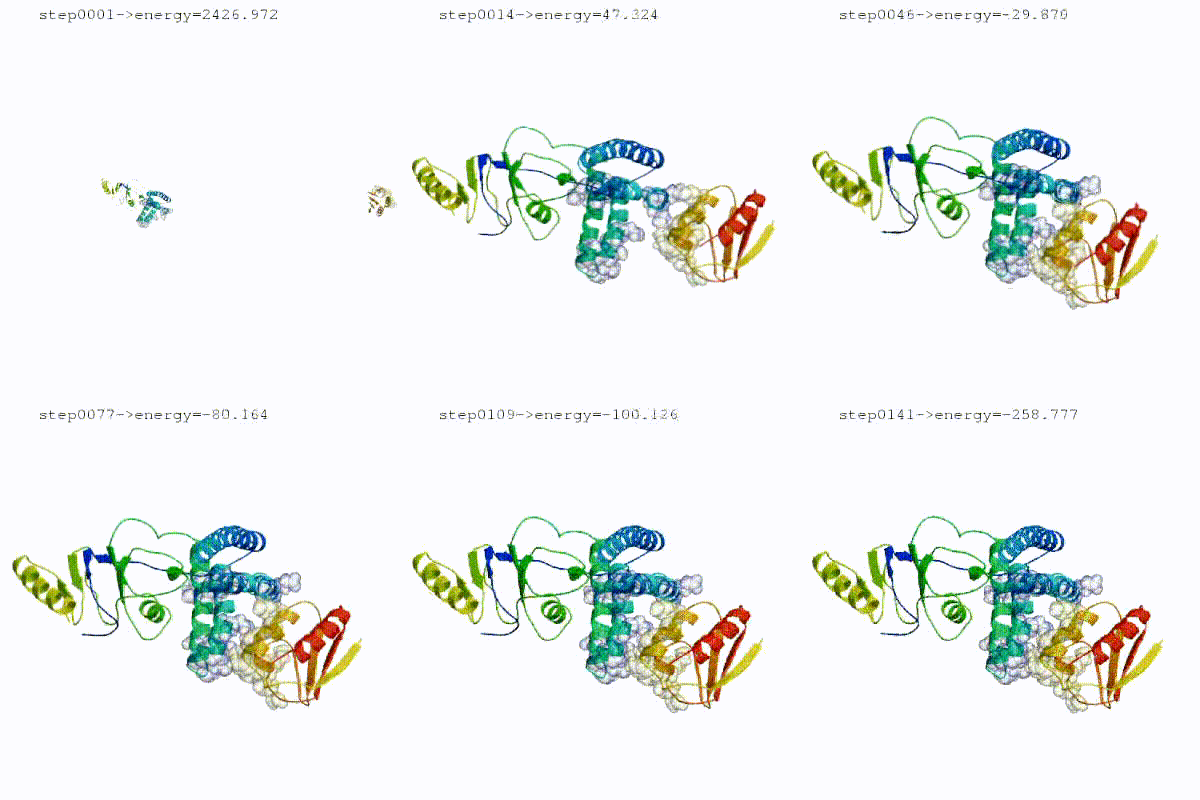
1. Randomization of orientations and rigid-body minimization (it0) In this initial stage, the interacting partners are treated as rigid bodies, meaning that all geometrical parameters such as bonds lengths, bond angles, and dihedral angles are frozen. The partners are separated in space and rotated randomly about their centres of mass. This is followed by a rigid body energy minimization step, where the partners are allowed to rotate and translate to optimize the interaction. The role of AIRs in this stage is of particular importance. Since they are included in the energy function being minimized, the resulting complexes will be biased towards them. For example, defining a very strict set of AIRs leads to a very narrow sampling of the conformational space, meaning that the generated poses will be very similar. Conversely, very sparse restraints (e.g. the entire surface of a partner) will result in very different solutions, displaying greater variability in the region of binding.
See animation of rigid-body minimization (it0):
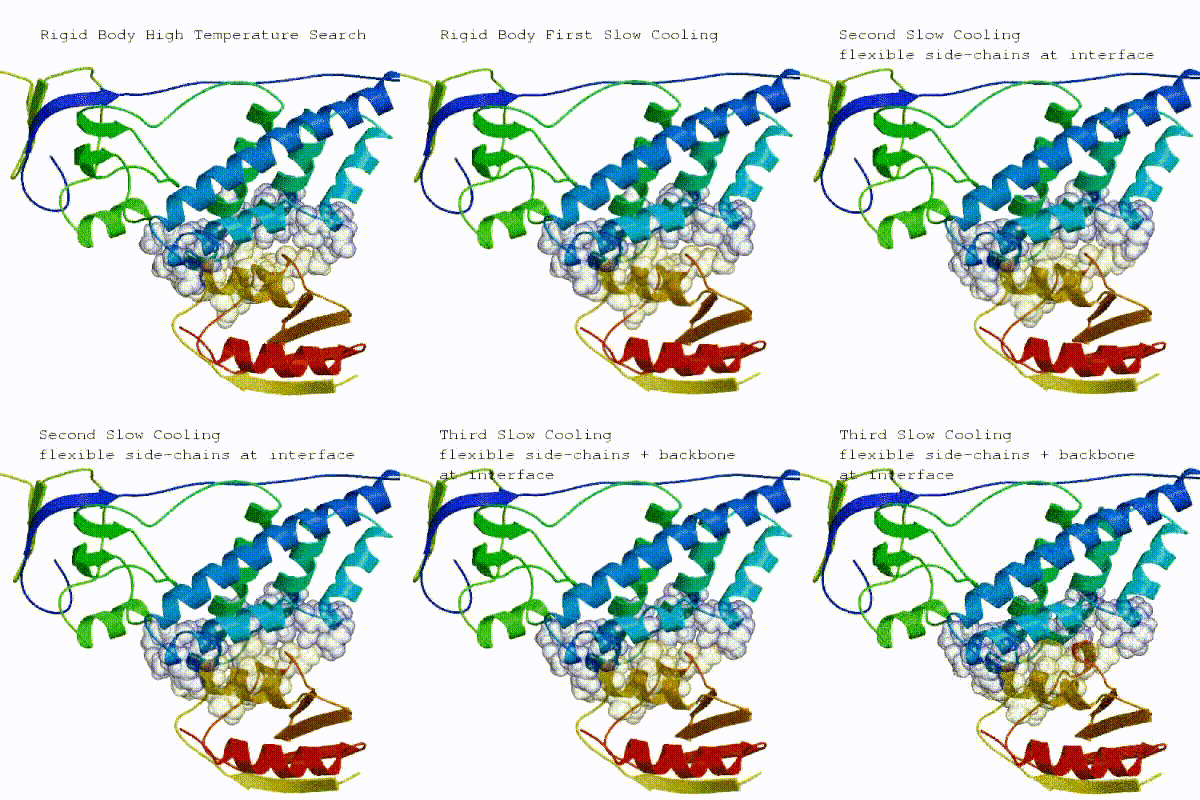
2. Semi-flexible simulated annealing in torsion angle space (it1) The second stage of the docking protocol introduces flexibility to the interacting partners through a three-step molecular dynamics-based refinement in order to optimize interface packing. It is worth noting that flexibility in torsion angle space means that bond lengths and angles are still frozen. The interacting partners are first kept rigid and only their orientations are optimized. Flexibility is then introduced in the interface, which is automatically defined based on an analysis of intermolecular contacts within a 5Å cut-off. This allows different binding poses coming from it0 to have different flexible regions defined. Residues belonging to this interface region are then allowed to move their side chains in a second refinement step. Finally, both backbone and side chains of the flexible interface are granted freedom. The AIRs again play an important role at this stage since they might drive conformational changes.
See animation of semi-flexible simulated annealing (it1):
3. Refinement in Cartesian space with explicit solvent (itw)
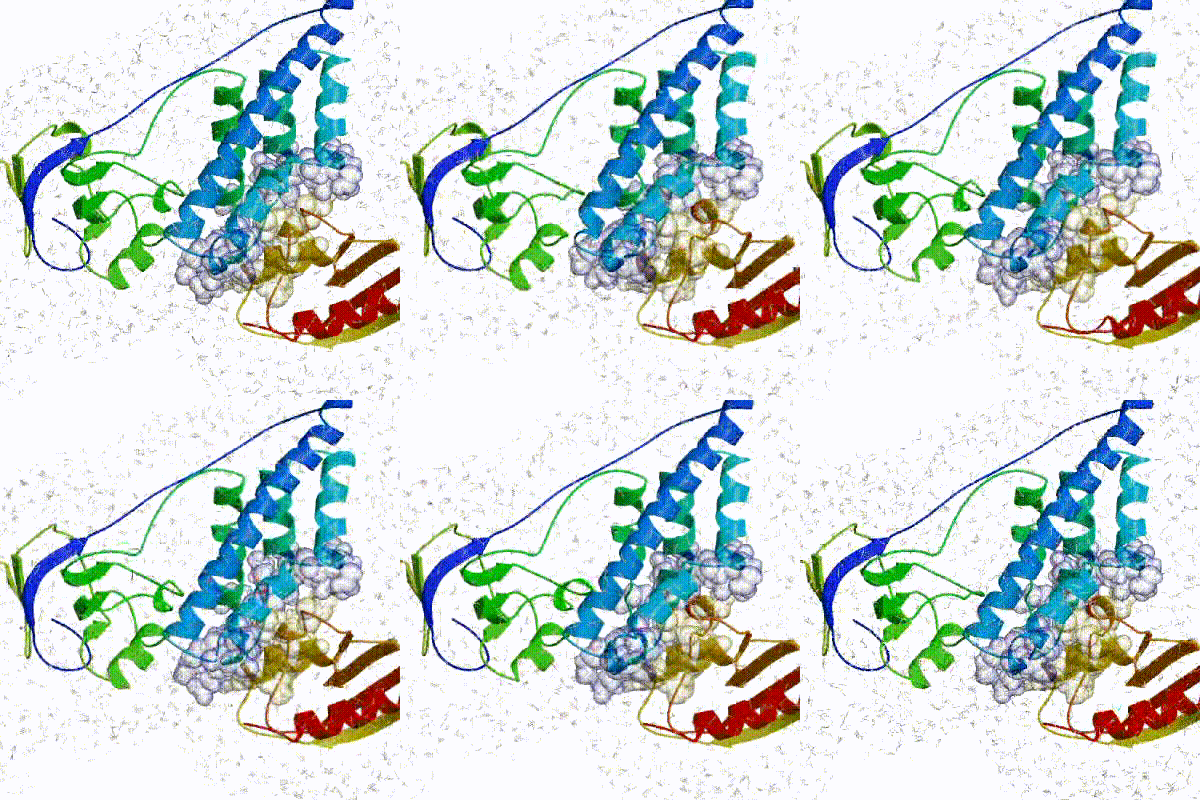
The final stage of the docking protocol immerses the complex in a solvent shell so as to improve the energetics of the interaction. HADDOCK currently supports water (TIP3P model) and DMSO environments. The latter can be used as a membrane mimic. In this short explicit solvent refinement the models are subjected to a short molecular dynamics simulation at 300K, with position restraints on the non-interface heavy atoms. These restraints are later relaxed to allow all side chains to be optimized.
Note that as of v2.4, it is no longer performed by default, which used to be the case up to (and including) v2.2.
Instead, a short energy minimisation in Cartesian space is performed.
Users can still opt for refinement with explicit solvent as an alternative to this energy minimisation.
See animation of refinement in explicit solvent (water):
The performance of this protocol of course depends on the number of models generated at each step. Few models are less probable to capture the correct binding pose, while an exaggerated number will become computationally unreasonable. The standard HADDOCK protocol generates 1000 models in the rigid body minimization stage, and then refines the best 200 – regarding the energy function - in both it1 and water. Note, however, that while 1000 models are generated by default in it0, they are the result of five minimization trials and for each of these the 180º symmetrical solution is also sampled. Effectively, the 1000 models written to disk are thus the results of the sampling of 10.000 docking solutions. The final models are automatically clustered based on a specific similarity measure - either the positional interface ligand RMSD (iL-RMSD) that captures conformational changes about the interface by fitting on the interface of the receptor (the first molecule) and calculating the RMSDs on the interface of the smaller partner, or the fraction of common contacts (current default) that measures the similarity of the intermolecular contacts. For RMSD clustering, the interface used in the calculation is automatically defined based on an analysis of all contacts made in all models.
Inspecting and preparing E2A for docking
We will now inspect the E2A structure. For this start PyMOL and in the command line window of PyMOL (indicated by PyMOL>) type:
fetch 1F3G
show cartoon
hide lines
You should see a cartoon representation of the protein.
It is known from the literature that a phosphate group interacts and can form a covalent bond with the side chain of a histidine residue.
Let us first check whether histidine residues are present in this structure:
show sticks, resn HIS
The histidine side chains are now displayed in stick representation. You can zoom in on the histidines using: zoom resn HIS
To return to the full view of the structure, type: zoom vis
This structure has two histidines present. How about phosphate group?
Is there a phosphate group present in this structure?
Hint : you can select phosphate atoms with the following command and check (read from the log) how many atoms are in this selection: select elem P
As a preparation step before docking, it is advised to remove any irrelevant water and other small molecules (e.g. small molecules from the crystallisation buffer), however do leave relevant co-factors if present. For E2A, the only irrelevant molecules in the PDB file are the water molecules. You can remove those by typing: remove resn HOH
Now let’s vizualize the residues affected by binding as identified by NMR. From Wang et al, EMBO J (2000) the following residues of E2A were identified has having significant chemical shift perturbations:
38,40,45,46,69,71,78,80,94,96,141
We will now switch to a surface representation of the molecule and highlight the NMR-defined interface. In PyMOL type the following commands:
color white, all
show surface
select e2a_active, (1F3G and resi 38,40,45,46,69,71,78,80,94,96,141)
color red, e2a_active
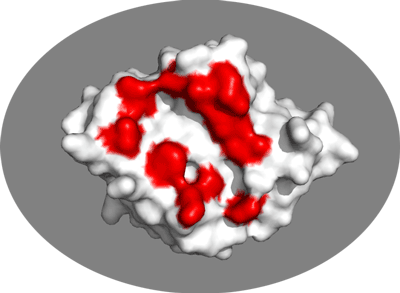
Inspect the surface.
Do the identified residues form a well defined patch on the surface? Do they form a contiguous surface?
The answer to the last question should be no: we can observe residue in the center of the patch that do not seem significantly affected while still being in the middle of the defined interface. This is the reason why in HADDOCK we also define “passive” residues that correspond to surface neighbors of active residues. These can be selected manually, or more conveniently you can let the HADDOCK server do it for you (see Setting up the docking run below).
As final step save the molecule as a new PDB file which we will call: e2a_1F3G.pdb
For this in the PyMOL menu on top select:
File -> Export molecule…
Click on the save button
Select as ouptut format PDB (*.pdb *.pdb.gz)
Name your file e2a_1F3G.pdb and note its location
Another way to save the structure as a PDB file is via the command: save e2a_1F3G.pdb, 1F3G
The file will be written to the current working directory:
- if PyMOL was launched from a terminal, it will be saved in the directory from which PyMOL was started;
- if PyMOL was opened manually (e.g., via the graphical interface), it is typically saved in your home directory.
After saving the molecule delete it from the PyMOL window or close PyMOL. You can remove the molecule by: delete 1F3G
Inspecting and preparing HPR for docking
We will now inspect the HPR structure. For this start PyMOL and in the command line window of PyMOL type:
fetch 1HDN
show cartoon
hide lines
Are there any histidines present in this structure? Is there a phosphate group present in this structure? Are there any irrelevant (for the docking) molecules present in this structure?
Let’s vizualise the residues affected by binding as identified by NMR. From Wang et al, EMBO J (2000) the following residues were identified has having significant chemical shift perturbations:
We will now switch to a surface representation of the molecule and highlight the NMR-defined interface. In PyMOL type the following commands:
color white, all
show surface
select hpr_active, (1HDN and resi 15,16,17,20,48,49,51,52,54,56)
color red, hpr_active
Again, inspect the surface.
Do the identified residues form a well defined patch on the surface? Do they form a contiguous surface?
You may have noticed that the set of PyMOL commands above took slightly longer to execute compared to the similar set of commands for E2A. This is because 1HDN is an NMR structure. Unlike X-ray structures, NMR entries contain an ensemble of models - in this case, we have 30 different conformers.
You can display all 30 conformers, looped in succession, using: mplay To stop the playback: mstop
HADDOCK is able to handle such ensembles by using each conformer in turn as a starting point for docking. We generally recommend limiting the number of conformers used. Otherwise, the number of possible combinations between the input molecules can quickly escalate (i.e. become very large). For example, if both partners contain 10 conformers, this results in 100 possible starting combinations. If 1000 rigid-body models are generated (see HADDOCK general concepts above), each combination would then be sampled only 10 times!
If limiting the number of input conformers is an unreasonable choice, it is possible to increase the number of models generated in the rigid-body docking stage (it0). However, this requires elevated permissions level on the HADDOCK 2.4 server, which you can request via “User Dashboard”.
Now let’s display all models of this NMR ensemble simultaneously in ribbon representation.
This representation is handy for visualizing backbone conformation:
hide all
show ribbon
set all_states, on
You should now be seeing the 30 conformers present in this NMR structure.
At first, it may appear that conformations are fairly conserved across all 30 models, but let us look at the side chains of the active residues:
show lines, hpr_active
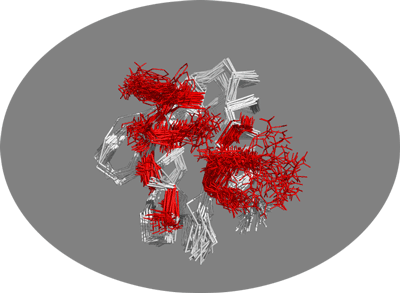
You should now be able to observe the range of conformational space sampled by these surface side chains. Some residues clearly adopt a wide variety of conformations, and one of these might resemble the bound conformation, hence leading to much better docking results. This illustrates the potential benefit of using an ensemble of conformations as starting points rather than a single structure, especially when there is no clear indication of which 1 out of the 30 models would be best for the docking.
As final step, save the molecule as a new PDB file which we will call hpr-ensemble.pdb. For this, in the PyMOL menu select: File -> Export molecule… Select as State 0 (all states) Click on Save… Select as output format PDB (*.pdb *.pdb.gz) Name your file hpr-ensemble.pdb and note its location
Note that it is important to change “State” from the default “-1” to “0”. Otherwise a single conformation will be saved instead of the multiple ones.
Adding a phosphate group
Since the biological function of this complex is to transfer a phosphate group from one protein to another via histidine side chains, it is important that the phosphate group participates in the docking. Yet both the structures we prepared and saved do not currently contain any phosphate group.
As a reminder (see Introduction above), in bacteria the phosphate group is transferred between histidine residues of the interacting proteins. From the literature it is known that in E2A histidine 90 is involved in this transfer. We can include phosphate group into the docking by modifying this canonical histidine into a phosphorylated histidine, i.e. histidine with covalently attached phosphate group.
HADDOCK supports a number of modified amino acids, which can be found at: https://wenmr.science.uu.nl/haddock2.4/library.
To use a modified amino acid in HADDOCK, it is sufficient to edit the PDB file and change the residue name of the corresponding residue. There is no need to add or delete atoms - HADDOCK will take care of removing the irrelevant atoms and building the missing atoms automatically while generating the topology of the system.
To introduce this modification: Open the PDB file e2a_1F3G.pdb in your favorite text editor Find the histidine with residue sequence number equal to 90 Remember that residue sequence number is the second integer value in the coordinate lines (starting with “ATOM” or “HETATM”). Check this link for more info. Change this residue name to NEP Save the file under a new name, e.g. e2aP_1F3G.pdb
Note that the same procedure can also be used to introduce mutations in an input protein structure.
Setting up the docking run
Registration / Login
In order to use HADDOCK web server, you need to navigate to wenmr portal and login. After successful validation of credentials, scroll down to “Services”, locate HADDOCK v2.4 and click on “Go to service”. Or use this link: https://wenmr.science.uu.nl/haddock2.4/.
HADDOCK submission: Input data
Locate and click on the “Submit a new job” button. Note that you are now in “Input data” tab.
In this stage of the submission process we will upload the structures we previously prepared with PyMOL.
-
Step1: In the field “Job name”, define a name for your docking run, e.g. E2A-HPR.
-
Step2: In the field “Number of molecules”, select the number of molecules to dock, in this case 2, which is the default value.
-
Step3: In the section “Molecule 1 - input”, upload the PDB file for E2A.
Which chain to be used? -> All (for this particular case) PDB structure to submit -> Browse and select e2aP_1F3G.pdb (the file you edited to modify the histidine)
Leave all other options to their default values. Note that you can fold and unfold the “Molecule 1 - input” section by clicking on the ▼ icon. This works for any section and subsection of HADDOCK2.4 server.
- Step4: In the subsection “Molecule 2 - input”, upload the PDB file for HPR.
Which chain to be used? -> All (for this particular case) PDB structure to submit -> Browse and select hpr-ensemble.pdb (the ensemble of NMR conformations you saved)
Note that HADDOCK server will automatically adjust several docking parameters based on the field “What kind of molecule are you docking?”.
- Step 5: Click on the “Next” button at the bottom left of the interface.
This will upload the structures to the HADDOCK webserver where they will be processed and validated (checked for formatting errors). The server makes use of Molprobity to check side chain conformations, eventually swap them (e.g. for asparagines) and define the protonation state of histidine residues.
HADDOCK submission: Input parameters
If processing and validation of the input files run without errors, you will be brought to the “Input parameters” tab. In case any issues had occurred - you will remain in the “Input data” tab and the error message will be shown either on top of the page or in the subsection for one of the molecules.
Definition of restraints
In this tab, we will define distance restraints by specifying active residues for each molecule.
- Step 6: In the section “Molecule 1 - parameters”, in the subsection “Active/Passive residues - Selection #1”, in the field “Active residues (directly involved in the interaction)”, specify the active residues for E2A.
Note that “residue sequence number” and “residue ID” are equivalent terms.
Active residues (directly involved in the interaction) -> 38,40,45,46,69,71,78,80,94,96,141 Automatically define passive residues around the active residues -> check (checked by default)
- Step 7: In the section “Molecule 2 - parameters”, in the subsection “Active/Passive residues - Selection #2”, in the field “Active residues (directly involved in the interaction)”, specify the active residues for the HPR.
Active residues (directly involved in the interaction) -> 15,16,17,20,48,49,51,52,54,56 Automatically define passive residues around the active residues -> check (checked by default)
Checking the histidines protonation state
The HADDOCK server assigns the protonation states of histidines automatically using MolProbity. However, we know that the histidine of HPR that is expected to interact with the phosphate group should be positively charged. From the literature, this residue in HPR is most likely histidine 15. Let’s make sure this histidine is positively charged.
- Step 8: In the section “Molecule 2 - parameters”, unfold the subsection “Histidine protonation state” and check the defined protonation state of HIS 15.
Change the state of HIS 15 to “HIS+”
- Step 9: Click on the “Next” button at the bottom left of the interface.
HADDOCK submission: Docking parameters
This interface allows us to modify many parameters that control the behaviour of HADDOCK but in our case the default values are all appropriate. The best way to learn more about these parameters is by completing the other HADDOCK 2.4 tutorials.
Scroll to the bottom of the page.
Here you should see buttons “Download parameter file” and “Download input files”. The “parameter file” is a json that contains all the settings of the run. We strongly recommend to download and keep this file - this will allow you to run reproducible experiments. With this file, you can use HADDOCK File Upload Interface to repeat the run with exact same parameters. This file can also be edited to change a one or a few parameters - it’s quicker than repeating all submission steps. An excerpt of this file is shown here:
    "amb_cool1": 10.0,
    "amb_cool2": 50.0,
    "amb_cool3": 50.0,
    "amb_firstit": 0,
    "amb_hot": 10.0,
    "amb_lastit": 2,
    "anastruc_1": 200,
...
The “input files” is a tar archive that contains all files HADDOCK will use during the run. For example, in this archive you will se 30 separate PDB file titled protein2_1.pdb, protein2_2.pdb … protein2_30.pdb - these are individual conformations extracted from hpr_ensemble.pdb we uploaded earlier. Another example is ambig.tbl - ths file will contain an actual list of distance restraints created based on the active residues we selected earlier. Lastly, job_params.json is the “parameter file” discussed above.
- Step 10: Click on the “Submit” button at the bottom left of the interface.
Your job has been successfully processed!
Upon submission you will be presented with a web page with a message “Your job has been successfully processed!”. This page allows you to track the execution of the run and also download “parameter file”.
At first your job will have status “Processed”, then “Queued”, and eventually it will change to “Running” and you will see progress bar moving along each stage.
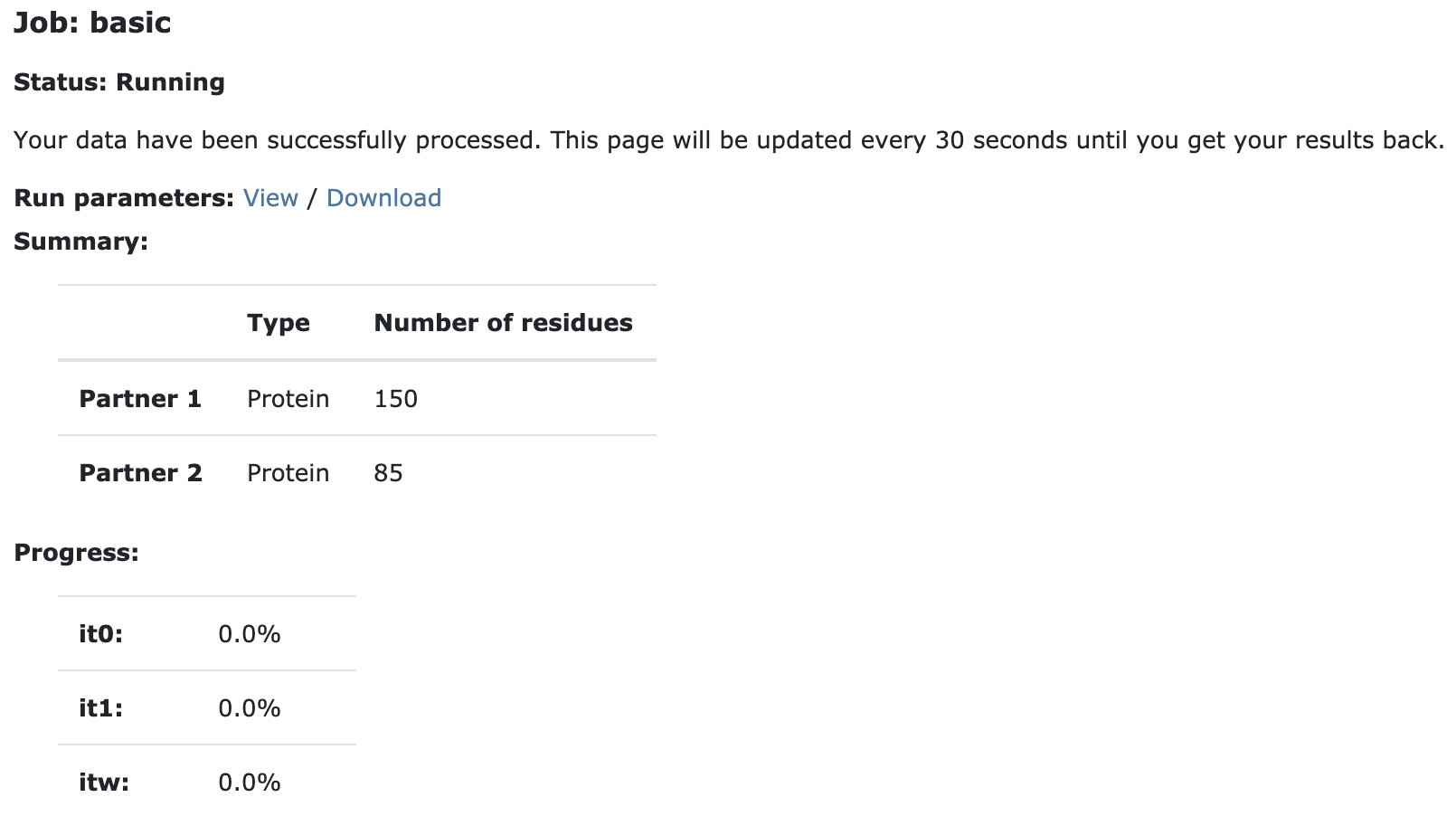
This run will take between 30 minutes to several hours - depending on the load of the server. You will be notified by email once your job has been completed. The results will remain accessible for a week.
You do not have to keep this page open, all recent jobs can be accessed via the “Workspace” button in the navigation bar.
Analysing the results
Once your run has completed (you will also be notified by email about it) you will be presented with a result page showing the cluster statistics and graphical representation of the run. An example output page for E2A-HPR docking can be found here - just in case you don’t want to wait for the results of your own docking run.
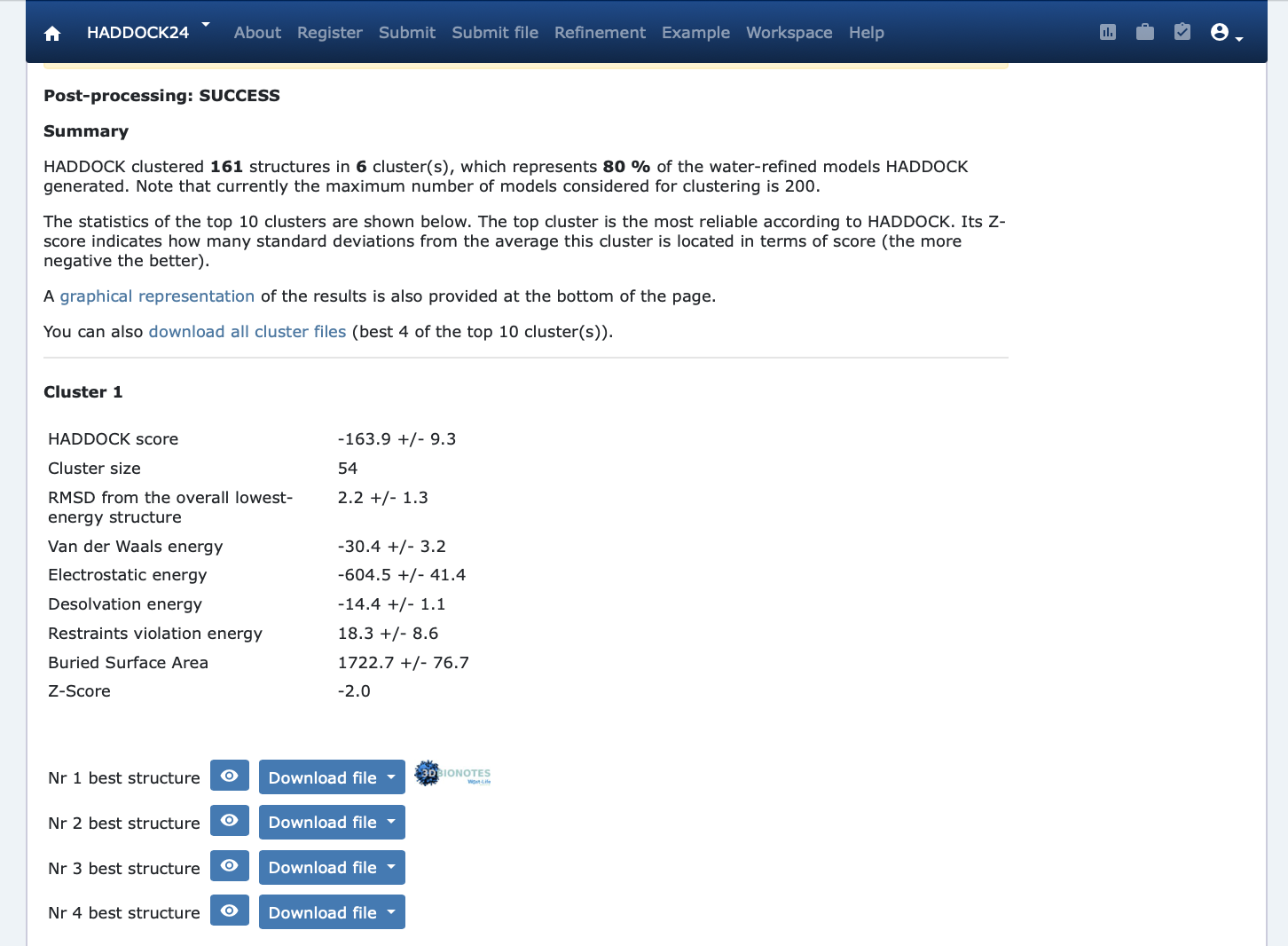
Inspect the result page. How many clusters have been generated?
For this run, 80% of 200 models have been clustered, meaning that run has converged. If only a small percentage on models have been clustered it might indicate, among the others, insufficient sampling with respect to the number of input conformers or that restraints are too diverse.
HADDOCK clusters are named according to the number of models they contain, e.g. the largest cluster is always labeled “Cluster 1”, the second-largest “Cluster 2”, and so on. Clusters are then ordered by their average HADDOCK score. As a result, it is not extremely unusual to see, for example, “Cluster 3” ranked above “Cluster 2”. For each cluster, the average and standard deviation of the HADDOCK score and other associated metrics are reported. These statistics are calculated using only the four lowest-scoring models within each cluster. The score for each model is calculated as:
HADDOCK_score = 1.0 * E_vdw + 0.2 * E_elec + 1.0 * E_desol + 0.1 * E_air,
where E_vdw is the intermolecular van der Waals energy, E_elec is the intermolecular electrostatic energy, E_desol represents an empirical desolvation energy term adapted from Fernandez-Recio et al. J. Mol. Biol. 2004, and E_air is a penalty for violation of the restraints.
At the bottom of this page you can find graphical representations of the results, showing the distribution of the solutions for HADDOCK score and its components as a function of the Fraction of Common Contact with- and RMSD from the best generated model (i.e. model with lowest HADDOCK score). The graphs are interactive and you can show/hide clusters, zoom in on specific areas of the plot, etc.
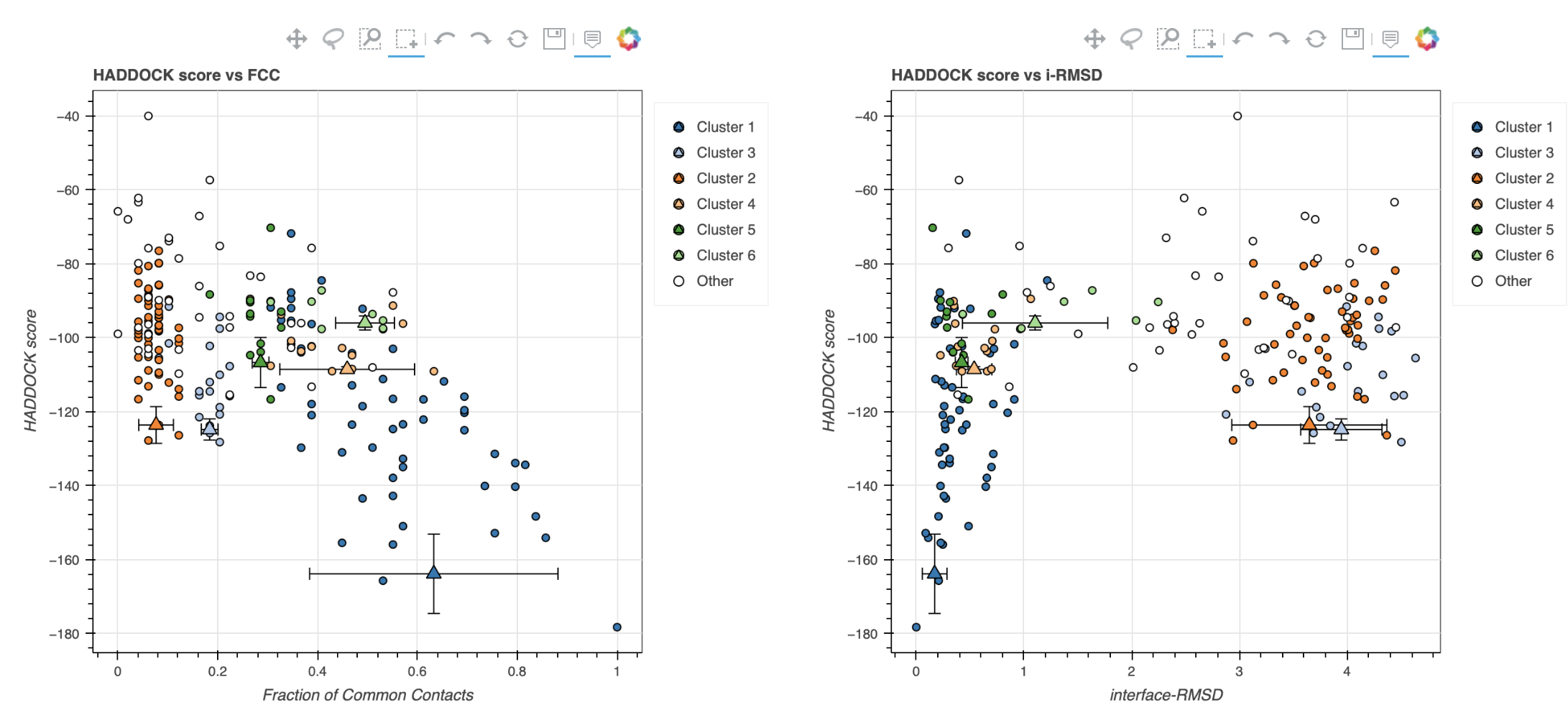
Can you locate the lowest-scored model on one of the graphs? What is the ID of this model?
In case the scores of various clusters are within standard deviation from each other, all clusters should be considered as a valid solution for the docking. Ideally, some additional independent experimental information should be available to decide on the best solution. In this case we do have such a piece of information: the phosphate transfer mechanism (see Biological insights below).
Note that the type of calculations performed by HADDOCK does have some chaotic nature, meaning that you will only get exactly the same results if you are running on the same hardware, operating system and using the same executable. The HADDOCK server makes use of EGI/EOSC high throughput computing (HTC) resources to distribute the jobs over a wide grid of computers worldwide. As such, your results might look slightly different from what is presented in the example output page, which was performed on our local cluster. Small differences in scores are to be expected, but the overall picture should be consistent.
Visualisation
HADDOCK server integrates the NGL viewer which allows you to quickly visualize a specific structure among clustered ones. For that click on the “eye” icon next to a structure.
In order to compare the various clusters we will however download the models and inspect them using PyMol. Download and save to disk the first model of each cluster (use the PDB format). To do it, search for the “download all cluster files” link just above the top-ranked cluster.
Then start PyMOL and load each cluster representative: File menu -> Open -> select cluster1_1.pdb
Repeat this for each cluster. Once all files have been loaded:
show cartoon
util.cbc
hide lines
You can display and hide a cluster by clicking on its name in the right panel of the PyMOL window.
Let’s superimpose all models on chain A of the first cluster:
select cluster1_1 and chain A
alignto sele
This will align all clusters on chain A (E2A), maximizing the differences in the orientation of chain B (HPR).
Examine the various clusters. How does the orientation of HPR differ between them?
Let’s now check if the active residues which we defined are actually part of the interface.
For this, we need to create selections of active residues for each molecule and colour them differently:
select e2a_active, (resi 38,40,45,46,69,71,78,80,94,96,141) and chain A
select hpr_active, (resi 15,16,17,20,48,49,51,52,54,56) and chain B
color red, e2a_active
color orange, hpr_active
You can display side chains of the active residues as lines to get a better view of their orientation:
show lines, e2a_active and sidechain
show lines, hpr_active and sidechain
Are the active residues in the interface? Is it the case for all clusters?
Biological insights
The E2A-HPR complex is involved in phosphate transfer, in which a phosphate group travels from histidine 15 of HPR to histidine 90 of E2A. As such, the docking models should make sense according to this information, meaning that two histidines should be in close proximity at the interface. Using PyMOL, check the various cluster representatives (we are assuming here you have performed all PyMOL commands of the previous section):
hide lines
util.cbc
select histidines, resn HIS+NEP
show sticks, histidines
util.cnc
First of all, has the phosphate group been properly generated?
Zoom on the phosphorylated histidine (called NEP in HADDOCK) using the following PyMOL command:
zoom resn NEP
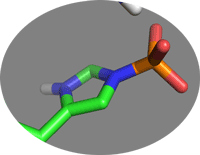
Zoom back to all visible molecules with:
zoom vis
Now inspect each cluster in turn and check if histidine 90 of E2A is in close proximity to another histidine of HPR.
Comparison with the reference structure
As explained in the introduction, the structure of the native complex has been determined by NMR (PDB ID 1GGR) using a combination of intermolecular NOEs and dipolar coupling restraints. We will now compare the docking models with this structure.
If you still have all cluster representative open in PyMOL you can proceed with the following analysis, otherwise load again each cluster representatives as described above. Then, fetch the reference complex and colour its chains:
fetch 1GGR
show cartoon
color yellow, 1GGR and chain A
color orange, 1GGR and chain B
The numbering of chain B in this structure is different from the HPR numbering in the structure we used: it starts at 301 while in our models chain B starts at 1. We can shift the residue numbering by 300 using the following command:
alter (chain B and 1GGR), resv -=300
This shift is critical for appropriate residue mapping when performing the RMDS calculation described below!
Let’s superimpose all cluster representatives on the chain A of the reference structure:
alignto 1GGR and chain A
One of the common metrics for the evaluation of the similarity of the complexes is ligand-RMSD (lRMSD). It is calculated by fitting a complex on the receptor chain (E2A or chain A in our case) and calculating the RMSD on the backbone of the ligand (HPR or chain B in our case). This can be done in PyMOL with:
align 1GGR and chain A, cluster1_1 and chain A
rms_cur cluster1_1 and chain B, 1GGR
In the community-wide blind protein-protein prediction experiment CAPRI (Critical PRediction of Interactions), the following cutoff are used to define the quality of the model with respect to the native structure:
- acceptable model: lRMSD<10Å
- medium quality model: lRMSD<5Å
- high quality model: lRMSD<1Å
Congratulations! 🎉
You have completed this tutorial. If you have any questions or suggestions, feel free to contact us via email or asking a question through our support center.
Additional docking runs
If you are curious and want learn more the impact of the input data on the docking results in HADDOCK, consider performing and analysing the following runs:
- E2A-HPR docking without defining the phosphorylated histidine;
- E2A-HPR docking using only the first model of the HPR ensemble - you can either open ensemble in PyMOL and save the 1st state only, or manually copy “MODEL 1” from file using text editor, or use PDBTOOLS.
Don’t hesitate to browse education page, you will find more tutorials these!